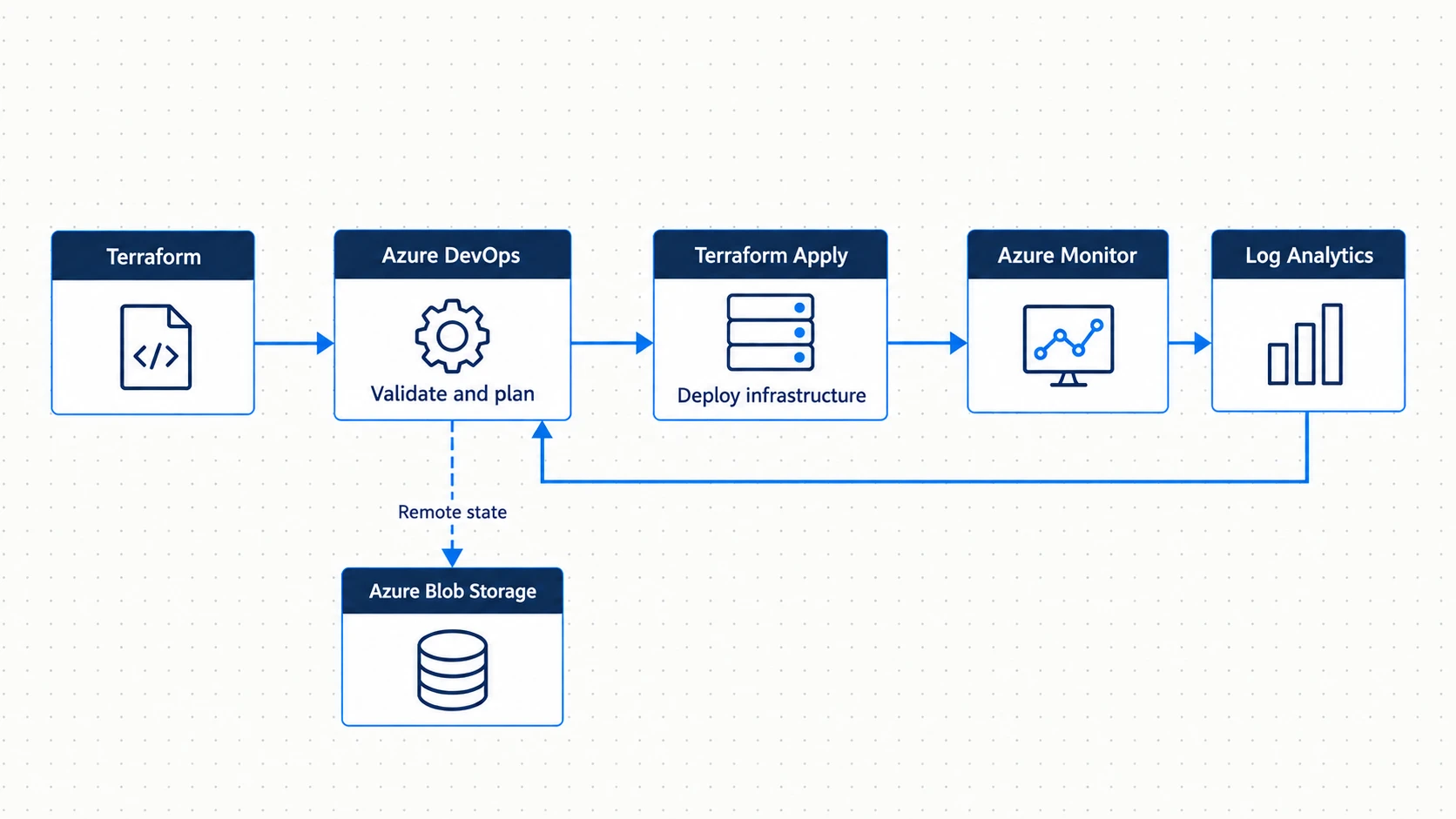
Terraform and Azure DevOps automation concept.
Infrastructure as code gets a lot more useful when you add real controls around it. That means deployment governance, isolated environments, secure auth, policy enforcement, remote state, and central monitoring.
I designed an enterprise-style Azure delivery platform around Terraform, Azure DevOps YAML pipelines, and GitOps principles. Creating Azure resources was the easy part. I wanted a controlled process to define, review, validate, approve, deploy, and audit changes across dev, staging, and production.
Note: This is an architecture design, not a record of a production deployment. I modeled it on what organizations running shared, multi-environment Azure setups usually need.
Repo:
https://github.com/dcepeda31415/terraform-azure-devops
1. The problems I wanted to solve
Manual Azure admin gets harder to control as things grow.
A team might start by clicking around the portal. Once there are several engineers and environments, problems show up:
- Development, staging, and production gradually diverge
- Resources are created with inconsistent names, SKUs, tags, or security settings
- Changes are difficult to audit because there is no complete version-controlled record
- Simultaneous deployments can conflict with one another
- Credentials can end up stored in scripts or pipeline variables
- Insecure configurations may reach production before anyone notices
- Production changes may occur without a formal review or approval step
My fix was to treat infrastructure delivery like software engineering.
Here’s the flow I wanted:
Infrastructure change
        │
        ▼
Git commit / pull request
        │
        ▼
Automated validation
        │
        ├── terraform validate
        ├── tfsec
        └── Checkov
        │
        ▼
Terraform plan
        │
        ▼
Review / approval
        │
        ▼
Terraform apply
        │
        ▼
Azure
Git holds the record of what the infrastructure should be. Azure DevOps controls how changes get from code into Azure.
2. Design goals
I built the design around a few goals.
Infrastructure lives in reusable Terraform modules, not repeated portal steps. Environment values come in as parameters and never sit inside modules. Dev, staging, and production stay isolated at the state, credential, and deployment levels.
Every change passes automated checks before it deploys. Production needs a human to approve it. Secrets live in Azure Key Vault. They don’t go in Terraform files, repos, or normal pipeline variables.
Terraform state is remote and safe from concurrent runs. Compliance gets checked twice. Code scanning catches issues before deployment, and Azure Policy enforces rules at the Azure control plane. Deployment history and health stay visible through Azure DevOps, Azure Monitor, Log Analytics, and Grafana.
3. High-level architecture
I split the platform into five layers:
1. Infrastructure-as-Code
   Terraform modules and environment configurations

2. CI/CD orchestration
   Azure DevOps YAML pipelines

3. State management
   Azure Storage remote backend and locking

4. Security and governance
   Key Vault, RBAC, Azure Policy, Workload Identity Federation,
   tfsec, and Checkov

5. Monitoring and auditability
   Azure Monitor, Log Analytics, Grafana, pipeline history,
   Git history, and stored plan artifacts
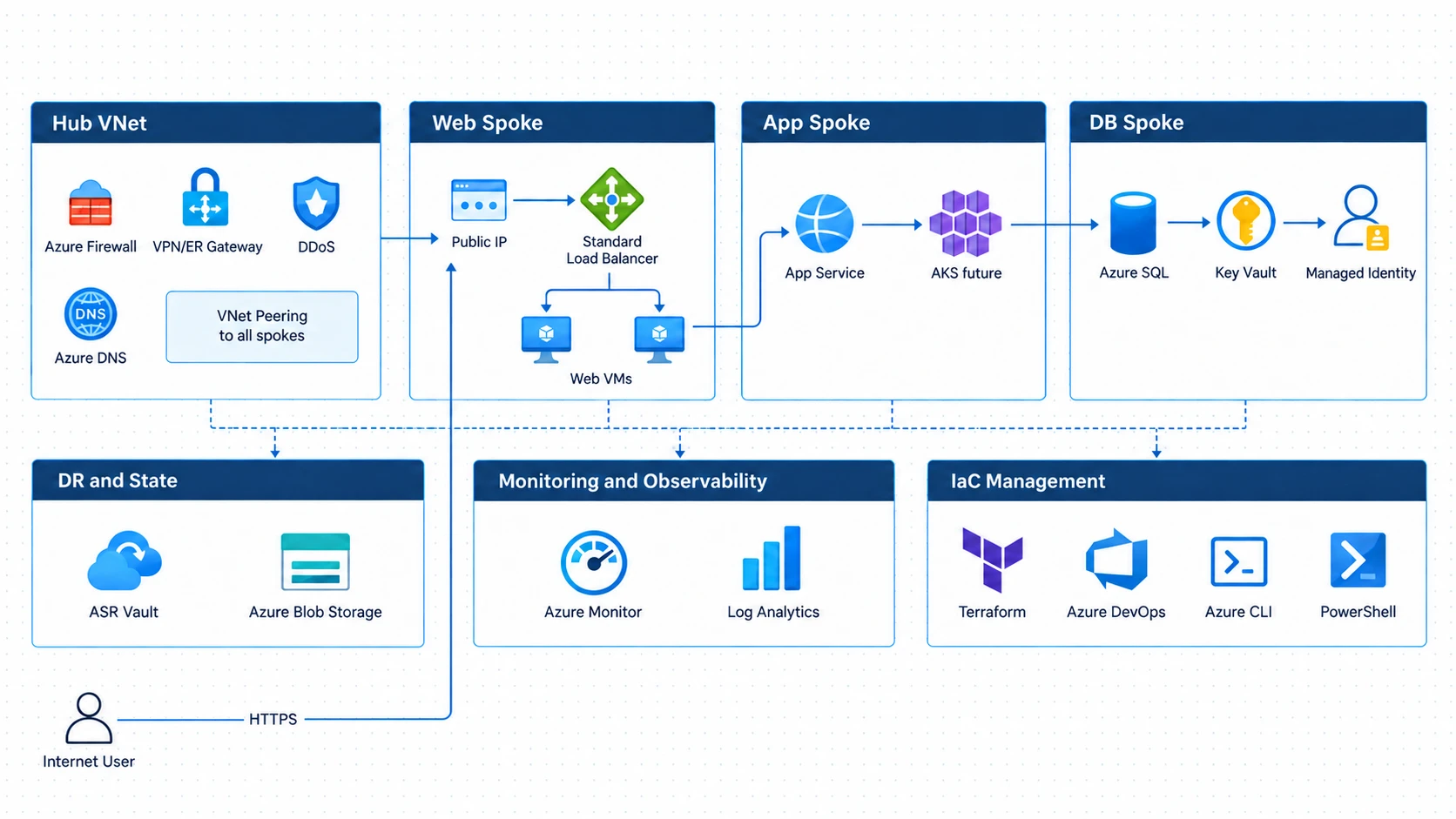
The Azure environment this automation builds is a hub-spoke design. It has separate web, app, and database tiers, VM Scale Sets, Azure Key Vault, private connectivity, Azure SQL, and disaster recovery pieces.
Multi-tier Azure infrastructure architecture used by the automation platform
I kept the automation separate from the workload on purpose. Terraform and Azure DevOps are the delivery system. The network, compute, database, and app resources are what gets delivered.
4. Repo structure
I separated reusable modules from environment config.
├── environments/
│   ├── dev/
│   │   ├── main.tf
│   │   ├── variables.tf
│   │   ├── terraform.tfvars
│   │   └── backend.tf
│   ├── staging/
│   │   └── ...
│   └── prod/
│       └── ...
└── modules/
    ├── network/
    ├── compute/
    ├── database/
    ├── security/
    ├── monitoring/
    └── aks/
Each environment folder holds its own values and backend config.
Each module covers one area:
network/
  VNets, subnets, NSGs, peering

compute/
  virtual machines, VM Scale Sets, load balancers

database/
  Azure SQL and private endpoints

security/
  Key Vault, Managed Identity, RBAC

monitoring/
  Log Analytics and diagnostic settings

aks/
  AKS clusters and node pools
The same module code gets reused everywhere. Each environment just supplies its own region, names, SKUs, address spaces, capacity, and other settings.
5. Module rules
I followed a few rules for the modules.
Environment values come in as input variables. No hard-coded environment names, regions, SKUs, or resource names inside a module.
Outputs expose the IDs and connection info other modules need. For example, the network module outputs a subnet ID that the compute module uses later.
Naming is handled through variables and locals so names stay predictable across environments.
Module versions can be pinned with Git refs or tags. That way production doesn’t pick up every module change the moment it’s committed.
I didn’t aim for maximum abstraction. I avoided turning every small value into another layer. A module should remove useful repetition without being harder to read than the resources it manages.
6. Keeping environments isolated
I looked at Terraform workspaces but went with separate environment folders with their own backend config.
Workspaces let you reuse one codebase, but they share backend config. In an enterprise that’s a governance problem. The boundaries are fuzzier and it’s easier to run something against the wrong workspace.
Separate folders are clearer:
environments/dev
environments/staging
environments/prod
Each environment gets:
its own state file
its own backend configuration
its own Azure DevOps service connection
its own variable group
its own approval policy
That makes access control and boundaries much easier to reason about.
7. Branches and deployments
I mapped Git branches to deployment behavior.
main        → production deployment, approval required
staging     → staging deployment, approval required
develop     → development deployment, automated
feature/*   → pull-request validation only
A feature branch never deploys anything. It only validates changes before merge.
Development is for fast iteration and deploys automatically.
Staging adds a review step before changes get closer to production.
Production needs an explicit approval.
So the same definitions move forward through stricter and stricter controls.
8. Pipeline stages
The pipeline has separate stages for validation, planning, approval, and deployment.
Here’s a simplified version:
stages:
  - stage: Validate
    jobs:
      - job: TerraformValidate
        steps:
          - task: TerraformInstaller
          - script: terraform init -backend=false
          - script: terraform validate
          - script: tfsec .
          - script: checkov -d .

  - stage: Plan
    dependsOn: Validate
    jobs:
      - job: TerraformPlan
        steps:
          - script: terraform init
          - script: terraform plan -out=tfplan
          - publish: tfplan

  - stage: Approve
    dependsOn: Plan
    condition: and(
      succeeded(),
      eq(variables['Build.SourceBranch'], 'refs/heads/main')
    )
    jobs:
      - deployment: ManualApproval
        environment: production

  - stage: Apply
    dependsOn: Approve
    jobs:
      - job: TerraformApply
        steps:
          - download: tfplan
          - script: terraform apply tfplan
Task syntax changes between Azure DevOps versions. The structure is what matters.
Validate
This stage runs cheap checks before Terraform touches the backend or creates anything.
It runs:
terraform init -backend=false
terraform validate
tfsec .
checkov -d .
It catches syntax errors, bad config, security issues, and policy problems early.
Plan
Once validation passes, Terraform initializes normally and saves a plan.
terraform init
terraform plan -out=tfplan
The plan gets published as a pipeline artifact.
Approval
For production, an Azure DevOps Environment adds a manual approval gate. Reviewers look at the planned change before it can deploy.
Apply
Apply downloads the saved plan and applies that exact plan.
terraform apply tfplan
This matters for governance. What gets applied is exactly what got reviewed.
9. Why the saved plan matters
A lot of pipelines run terraform plan for review and then plan again right before terraform apply.
I avoided that on purpose.
State can change between the two plans. If Apply builds a new plan after approval, the deployment might not match what reviewers approved.
So instead:
Plan stage
   │
   └── produces tfplan
          │
          ▼
     pipeline artifact
          │
          ▼
       approval
          │
          ▼
Apply stage downloads and applies tfplan
The approval covers a specific artifact, not just a general plan to deploy.
10. Remote Terraform state
State lives in Azure Blob Storage, not on anyone’s laptop.
Here’s a sample backend config:
terraform {
  backend "azurerm" {
    resource_group_name  = "terraform-state-rg"
    storage_account_name = "tfstate${environment}"
    container_name       = "tfstate"
    key                  = "infrastructure.tfstate"
  }
}
Each environment uses its own backend config, so dev, staging, and production never share a state file.
Azure Storage also gives lease-based locking. Two Terraform runs can’t change the same state at once.
That matters on a team. Two pipelines or engineers making changes at the same time could corrupt state or leave infrastructure inconsistent.
Lock down the state storage with Azure RBAC so only approved service connections and admins can touch it.
11. Secrets in Azure Key Vault
Sensitive values never go in repo files.
Key Vault is the central store for things like:
database passwords
API keys
service account credentials
other application or deployment secrets
Azure DevOps pulls what it needs at runtime through the Key Vault integration.
For workloads in Azure, I used Managed Identity wherever I could. Apps can reach Azure services without stored credentials.
Terraform creates the identities and their Key Vault permissions as part of the build.
So the design keeps:
configuration
from
credentials
Terraform can point to where a secret lives without the secret ever landing in code.
12. Workload Identity Federation for Azure DevOps
The service connections use Workload Identity Federation, which is based on OIDC.
Normal service principal auth usually needs a long-lived client secret. That brings rotation work and leak risk.
With federation, Azure DevOps gets a short-lived token and trades it for Azure access. No stored client secret in the pipeline.
Each environment gets its own service connection.
The permission model:
development service connection
  → development resource groups

staging service connection
  → staging resource groups

production service connection
  → production resource groups
Permissions only cover the resource groups each pipeline manages. No subscription-wide access unless it’s truly needed.
13. RBAC
The role model keeps human access separate from pipeline deploy rights.
For example:
Infrastructure engineers
  Contributor in development
  Reader in staging and production

Senior engineers
  Contributor in staging
  Reader in production

Release approvers
  pipeline approval authority
  no requirement for direct Azure write access

Production pipeline
  deployment rights through its service connection
This pushes production changes through the audited pipeline instead of the portal.
It also backs up the GitOps approach. The official change path is:
Git change → review → pipeline → Azure
not:
engineer → Azure portal → manual change
14. Security scanning with tfsec and Checkov
Static security scanning runs before anything deploys.
I used both:
tfsec
Checkov
They check Terraform config for insecure or non-compliant patterns.
Running them in the validation stage gives feedback earlier.
The team doesn’t have to wait for Azure Policy to reject a half-finished deployment. Many problems get caught before the plan even reaches approval.
The findings also stay visible during code review.
False positives still need attention. If people keep seeing findings they know don’t matter, they stop reading the scanner output at all.
So suppressions and baselines need to be documented and reviewed. Don’t add them casually.
15. Azure Policy as a second layer
Static analysis checks code. Azure Policy enforces rules at the Azure control plane.
I used policies like these:
| Policy | Type | Effect | Purpose |
|---|---|---|---|
| Require TLS 1.2 minimum | Built-in | Deny | Prevent insecure TLS configuration |
| Restrict allowed locations | Custom | Deny | Enforce data-residency requirements |
| Require diagnostic settings | Custom | DeployIfNotExists | Forward required logs |
| Restrict allowed VM SKUs | Custom | Deny | Prevent unsupported or oversized compute |
| Require resource tags | Built-in | Deny | Enforce tagging and cost-governance standards |
That gives defence in depth.
If a module misses a bad config, Azure Policy can still reject it.
Each layer has its own job:
tfsec / Checkov
  pre-deployment feedback

Azure Policy
  platform-level enforcement
16. Central monitoring
Monitoring is part of the Terraform design. It isn’t bolted on after deployment.
The monitoring module sets diagnostic settings so resources send logs and metrics to one Log Analytics Workspace.
It can watch things like:
VM availability
database connectivity failures
VM Scale Set scaling activity
platform health events
resource diagnostics
Azure DevOps deployment events can go there too through service hooks. Then you can look at infrastructure events and deployments side by side.
17. Grafana dashboards
Grafana sits on top of Azure Monitor and Log Analytics as another view.
I planned dashboards for:
infrastructure health
resource performance
current alerts
deployment activity
deployment success rates
environment change frequency
cost by environment
cost by ownership tags
That gives everyone one shared view across dev, staging, and production.
18. Audit trail
The platform leaves several audit records.
Git records:
what changed
who authored it
when it changed
who reviewed it
Azure DevOps records:
which pipeline ran
who triggered it
which environment was targeted
who approved production
whether deployment succeeded
The saved plan artifacts record exactly what each deployment proposed.
Together you can trace a change from the code edit, through approval, into Azure.
19. Tech stack
Here’s everything the design uses:
| Category | Technologies |
|---|---|
| Infrastructure as Code | Terraform, HCL |
| CI/CD and source control | Azure DevOps, Azure Repos, YAML Pipelines |
| Security scanning | tfsec, Checkov |
| Cloud platform | Microsoft Azure, AKS, App Services, Azure SQL, VNets |
| State management | Azure Blob Storage remote backend |
| Security and governance | Key Vault, Azure RBAC, Azure Policy, Workload Identity Federation |
| Monitoring | Azure Monitor, Log Analytics, Grafana |
20. Problems it addresses
Configuration drift
Changes go through Git and pipelines, not random portal clicks. Production is less likely to drift from what’s in source control.
Credential exposure
Key Vault and Workload Identity Federation cut down on long-lived credentials in Terraform files and Azure DevOps variables.
Shared Terraform state
Azure Blob Storage centralizes state. Lease-based locking protects it during concurrent runs.
Production governance
Azure DevOps Environments add formal approvals before production.
Compliance
tfsec and Checkov check config before deployment. Azure Policy enforces controls on its own at runtime.
Auditability
Git history, pipeline history, approval logs, and saved plans form a full change trail.
21. Design decisions
Terraform instead of ARM or Bicep
Bicep has real advantages in Azure-only environments. It integrates directly with the platform and has no Terraform-style state file.
I picked Terraform for its mature module ecosystem, wide provider support, portability, and how common it is in multi-cloud work.
That’s a design choice. I’m not saying Terraform is always better.
Separate folders instead of workspaces
Folders give clearer isolation, separate backends, and stronger boundaries than shared workspaces.
Saved plan instead of replanning
Publishing the approved plan stops you from applying something different from what reviewers saw.
Workload Identity Federation instead of client secrets
Federation removes secret rotation and lowers the risk of stored service principal credentials.
Scanning before deployment
Catching issues in CI is faster and safer than only relying on a deploy-time denial.
Azure DevOps Environment approvals
Environment approvals give you assigned reviewers, timeouts, recorded decisions, and auditable production governance.
22. Trade-offs
No automation platform removes every risk.
Remote state is still a dependency
If the storage account holding state is down, Terraform can’t safely run.
So state storage needs its own resilience and recovery plan.
Big plans are slow
As Terraform manages more resources, terraform plan gets slower. Large state files can really stretch out CI runs.
Scanner findings need upkeep
tfsec and Checkov can flag false positives or things you’ve accepted on purpose. Someone has to keep those decisions current or the scanning stops being useful.
DeployIfNotExists isn’t instant
Azure Policy remediation with DeployIfNotExists can happen after the resource already exists. A Terraform run might finish before the remediation shows up.
Strict RBAC can slow down incidents
Taking write access away from engineers in staging and production helps governance. It also adds friction for teams used to fixing things right in the portal.
Good processes and observability have to make up for that.
23. Expected outcomes
If a company built this, the design should give them:
- Repeatable infrastructure deployment across dev, staging, and production
- Reduced configuration drift
- Earlier identification of security issues
- Governed production releases
- Centralised secret management
- Isolated Terraform state
- Complete infrastructure-change auditability
- Policy enforcement independent of individual Terraform modules
- Unified monitoring across infrastructure and deployment activity
These are expected outcomes from the design. They aren’t measured production results.
24. What I’d add next
A few ways to extend it.
OPA and Conftest can check Terraform plans against company-specific rules before approval.
Scheduled drift detection can run terraform plan on a timer to catch resources changed outside the pipeline.
Infracost can show cost changes in pull requests before approval.
Flux or Argo CD can bring the same GitOps approach to Kubernetes app delivery.
A self-service layer could let dev teams request approved patterns without giving them open Azure access.
The same Terraform delivery model could also stretch to other cloud providers if needed.
25. The full workflow
Here’s the whole flow:
Engineer
   │
   ▼
Feature branch
   │
   ▼
Pull request
   │
   ├── Terraform validation
   ├── tfsec
   └── Checkov
   │
   ▼
Merge
   │
   ▼
Azure DevOps pipeline
   │
   ▼
Terraform plan
   │
   ▼
Saved plan artifact
   │
   ▼
Environment approval
   │
   ▼
Terraform apply
   │
   ▼
Azure
   │
   ├── Azure Policy
   ├── Key Vault
   ├── RBAC
   └── Monitor / Log Analytics
Each layer adds its own control.
Terraform defines the infrastructure. Git records the change. Azure DevOps automates and governs delivery. Key Vault and federated identity protect credentials. Azure Policy enforces platform standards. Monitoring shows what’s happening after deployment.
Wrapping up
The main thing I took from this design is that Terraform is only one piece of enterprise infrastructure as code.
A mature setup also needs environment isolation, state protection, secure auth, automated checks, approvals, policy enforcement, monitoring, and a solid audit trail.
Put together, infrastructure changes become repeatable engineering work instead of one-off admin tasks. Dev teams can move fast in lower environments while production stays controlled, reviewable, and traceable.