A basic Terraform demo proves infrastructure as code works. Real infrastructure needs more than one config and a manual terraform apply.
I built this project to look more like a real workflow. It has reusable Terraform modules and separate dev and prod environments. It uses remote state, dependency handling, and automated CI/CD. It authenticates to AWS with short-lived credentials. It also runs security checks, policy checks, and cost estimates.
The stack:
- Terraform for AWS resource definitions
- Terragrunt for environment orchestration and dependency handling
- GitHub Actions for CI/CD
- AWS OIDC for short-lived authentication
- Checkov for static infrastructure security checks
- OPA/Conftest for policy-as-code validation
- Infracost for cost estimation
1. Reusable Terraform modules
I split the infrastructure into three modules:
modules/
├── vpc/
├── ec2/
└── s3/
Each one has its own job:
modules/vpc
  VPC
  public subnet
  internet gateway
  route table

modules/ec2
  EC2 instance
  security group

modules/s3
  S3 bucket
  versioning
  encryption
  public-access blocking
The main rule is that modules hold no environment-specific values. Things like dev, prod, CIDR ranges, instance names, and environment tags come in as variables from each environment.
That way one module serves every environment. No duplicated code.
Keep variable names consistent
One of my first bugs came from naming. I used one variable name in the module and a different one in the calling config.
I had:
environment
in one place, and:
env
in another.
Pick your naming rules before the config spreads across environments. It saves a lot of pain.
2. Organizing environments with Terragrunt
Terraform can handle multiple environments by itself. I used Terragrunt to cut down on repeated config.
The big win is the folder layout. Dev and prod stay isolated but share the same backend and provider setup.
Here’s the layout:
live/
├── terragrunt.hcl
├── dev/
│   ├── vpc/
│   │   └── terragrunt.hcl
│   ├── ec2/
│   │   └── terragrunt.hcl
│   └── s3/
│       └── terragrunt.hcl
└── prod/
    ├── vpc/
    │   └── terragrunt.hcl
    ├── ec2/
    │   └── terragrunt.hcl
    └── s3/
        └── terragrunt.hcl
The root config lives in:
live/terragrunt.hcl
It sets the shared behavior for every environment.
3. One place for backend and provider config
The root Terragrunt file defines three shared things:
S3 backend
DynamoDB state locking
Generated AWS provider configuration
Every environment-level terragrunt.hcl includes the root file.
So I write the backend and provider logic once. I don’t copy it into every dev and prod folder.
That’s the main reason I like Terragrunt for multiple environments. The environments stay separate and the repeated config stays in one spot.
4. Linking modules with dependencies
The EC2 module can’t deploy by itself. It needs things the VPC module creates.
At minimum it needs:
vpc_id
subnet_id
Hardcoding IDs like:
vpc-0a1b2c3d
would break every time the VPC gets recreated with a new ID.
Terragrunt fixes this with a dependency block.
Here’s what I used:
dependency "vpc" {
  config_path = "../vpc"

  mock_outputs = {
    vpc_id           = "vpc-00000000"
    public_subnet_id = "subnet-00000000"
  }

  mock_outputs_allowed_terraform_commands = [
    "validate",
    "plan"
  ]
}

inputs = {
  vpc_id    = dependency.vpc.outputs.vpc_id
  subnet_id = dependency.vpc.outputs.public_subnet_id
}
It points the EC2 config at the VPC config and reads its outputs.
Once the VPC exists, Terragrunt passes the real values into EC2 on its own.
Why mock outputs help
Before the VPC is ever deployed, there are no outputs to read.
mock_outputs gives placeholder values so validate and plan still work:
mock_outputs = {
  vpc_id           = "vpc-00000000"
  public_subnet_id = "subnet-00000000"
}
I limited the placeholders to:
validate
plan
so they never get used in a real deployment.
To plan the whole environment I ran:
terragrunt run --all plan
Terragrunt reads the dependency graph and knows the VPC has to go before EC2.
5. Bootstrapping remote state
Remote state has a chicken-and-egg problem.
Terraform needs an S3 bucket to store state. But the same config can’t create that bucket before the backend exists.
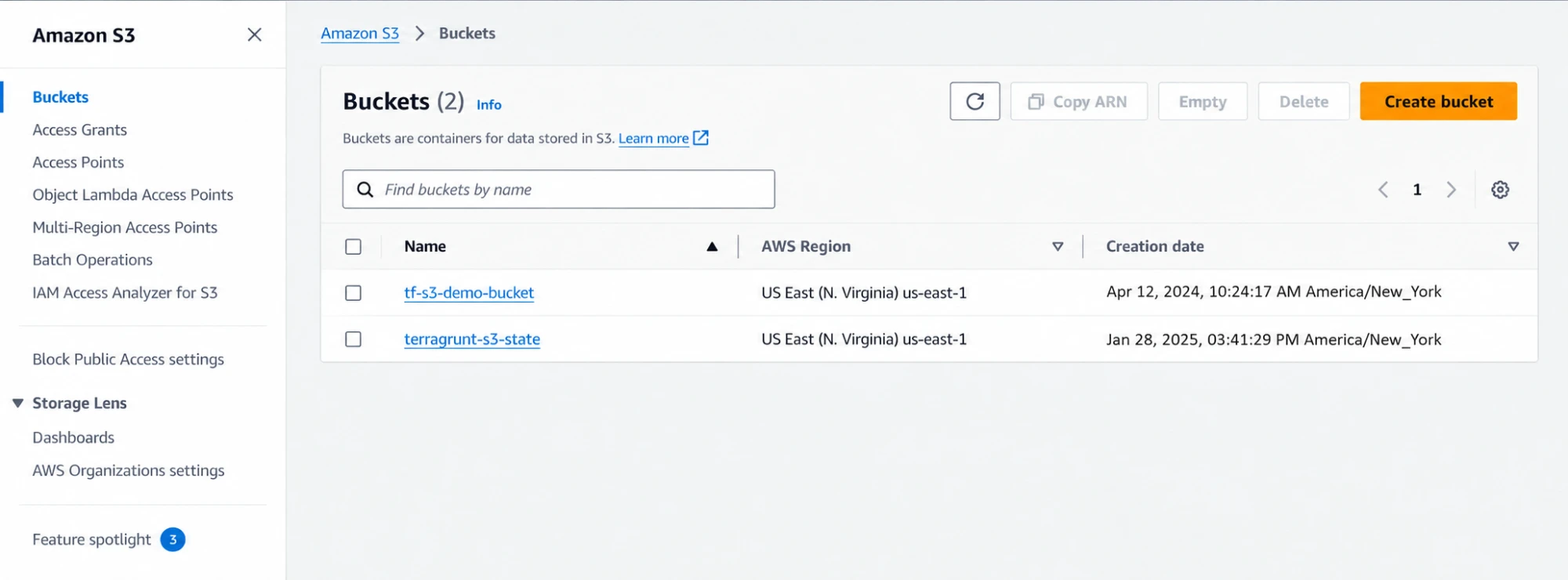
I solved it with a one-time bootstrap.
I created two resources by hand first:
S3 bucket
DynamoDB table
The bucket stores state and has versioning on.
The DynamoDB table handles state locking.
Once those existed, Terragrunt could set up the remote backend.
6. CI/CD with GitHub Actions
Next I moved from local commands to a repeatable pipeline.
I split the pipeline so changes get checked before they deploy.
The flow:
Pull request
  │
  ├── Terraform/Terragrunt plan
  ├── Checkov
  ├── OPA/Conftest
  └── Infracost

Main/manual workflow
  │
  └── Terragrunt apply

Additional workflow
  │
  └── Drift detection
Now the repo controls infrastructure changes. Nothing depends on commands from one person’s laptop.
7. GitHub Actions to AWS with OIDC
I didn’t want long-lived AWS keys in GitHub secrets.
So GitHub Actions authenticates with OpenID Connect.
On the AWS side there are two pieces:
IAM OIDC identity provider
IAM role trusted by that provider
The role’s trust policy is scoped to my repo with a subject like:
repo:username/reponame:*
GitHub Actions gets a short-lived token and uses it to assume the role.
No permanent keys stored anywhere in the repo.
Fixing the missing OIDC provider
My first pipeline run failed with:
Could not assume role with OIDC:
No OpenIDConnect provider found in your account
The role existed and the trust policy was set. But I never created the OIDC provider itself.
I confirmed it with:
aws iam list-open-id-connect-providers
Once I registered the GitHub OIDC provider in IAM, the role assumption worked.
The role and the OIDC provider are separate pieces. You need both.
8. Terragrunt CLI changes
Another failure came from a Terragrunt syntax change.
The old command was:
terragrunt run-all plan
I needed the new form:
terragrunt run --all plan
The old syntax gave me:
ERROR unknown command: "run-all"
The destroy command is:
terragrunt run --all destroy
When a command from an older example fails for no clear reason, check your installed CLI:
terragrunt --help
9. Adding Infracost
I wanted cost estimates in CI too.
My first try used:
infracost/actions/comment@v3
and failed with:
Error: Can't find 'action.yml', 'action.yaml' or 'Dockerfile'
for action 'infracost/actions/comment@v3'
The action’s structure had changed.
The new pattern:
1. Install the Infracost CLI
2. Run infracost breakdown
3. Run infracost comment github
The setup action is:
infracost/actions/setup@v3
The rest runs as shell commands instead of separate actions.
This lesson goes beyond Infracost. When a third-party action breaks, read its action.yml. It shows what the action expects and what you can redo with normal run: steps.
10. OPA and Conftest policy checks
I also added policy-as-code checks.
I started with:
--parser hcl
and Conftest returned:
Error: running test: parse configurations:
new parser: unknown parser: hcl
The fix was changing the parser to:
--parser hcl2
Small change. But it blocked the whole policy stage until I figured it out.
11. The first full deployment
With the Terragrunt, OIDC, pipeline, and tool issues fixed, a push to main ran the apply workflow successfully.
It created:
VPC
public subnet
internet gateway
route table
security group
EC2 instance
S3 bucket
The instance type was:
t2.micro
The whole deploy ran through the pipeline with OIDC. I never ran terraform apply from my laptop.
I kept it up for about six hours and then tore it down with:
terragrunt run --all destroy
The cost for that short run was tiny. That number was specific to my account and pricing at the time, so don’t treat it as a current estimate.
12. Handling Checkov results
Checkov reported:
34 checks total
20 passed
14 failed
I didn’t want every failure to block the pipeline. So I set:
soft_fail: true
and wrote down each failed check.
Some were things I’d fix in a production design. Others I accepted for a portfolio project because fixing them would add cost or complexity.
Two examples:
S3 cross-region replication
VPC flow logs
For each finding I recorded whether it was:
accepted temporarily
planned for production remediation
or deliberately excluded
A written decision beats quietly ignoring a failed check.
13. What I’d tell someone building this
Here’s the order I’d follow:
- Get plain Terraform working before adding Terragrunt.
- Learn Terragrunt dependencies and outputs before building the full environment tree.
- Do a real deployment early. Auth, AMI, backend, and provider issues don’t always show up in static checks.
- Use
terragrunt run --all destroyto get a test environment back to clean. - Write down design and security trade-offs when you make them. Don’t try to remember them later.
I documented choices like using a public subnet instead of NAT, broad IAM permissions for testing, and letting Checkov soft-fail. Those are project trade-offs. They are not production defaults.
14. Final architecture
Here’s the full design:
GitHub repository
       │
       ▼
GitHub Actions
       │
       ├── Plan
       ├── Checkov
       ├── OPA / Conftest
       ├── Infracost
       └── Apply / drift workflows
       │
       ▼
AWS OIDC
       │
       ▼
IAM Role
       │
       ▼
Terragrunt
       │
       ├── dev
       │   ├── VPC
       │   ├── EC2
       │   └── S3
       │
       └── prod
           ├── VPC
           ├── EC2
           └── S3
Terraform provides the reusable modules.
Terragrunt handles environment separation, remote state, shared config, and dependencies.
GitHub Actions runs validation and deployment.
OIDC gives temporary AWS credentials instead of stored keys.
The repo is here:
https://github.com/dcepeda31415/multi-env-aws-infra
15. Proof it deployed
Here’s what the pipeline created.
The S3 bucket holding Terraform remote state:
Terraform remote state stored in the S3 backend
The EC2 instance from the automated deploy:
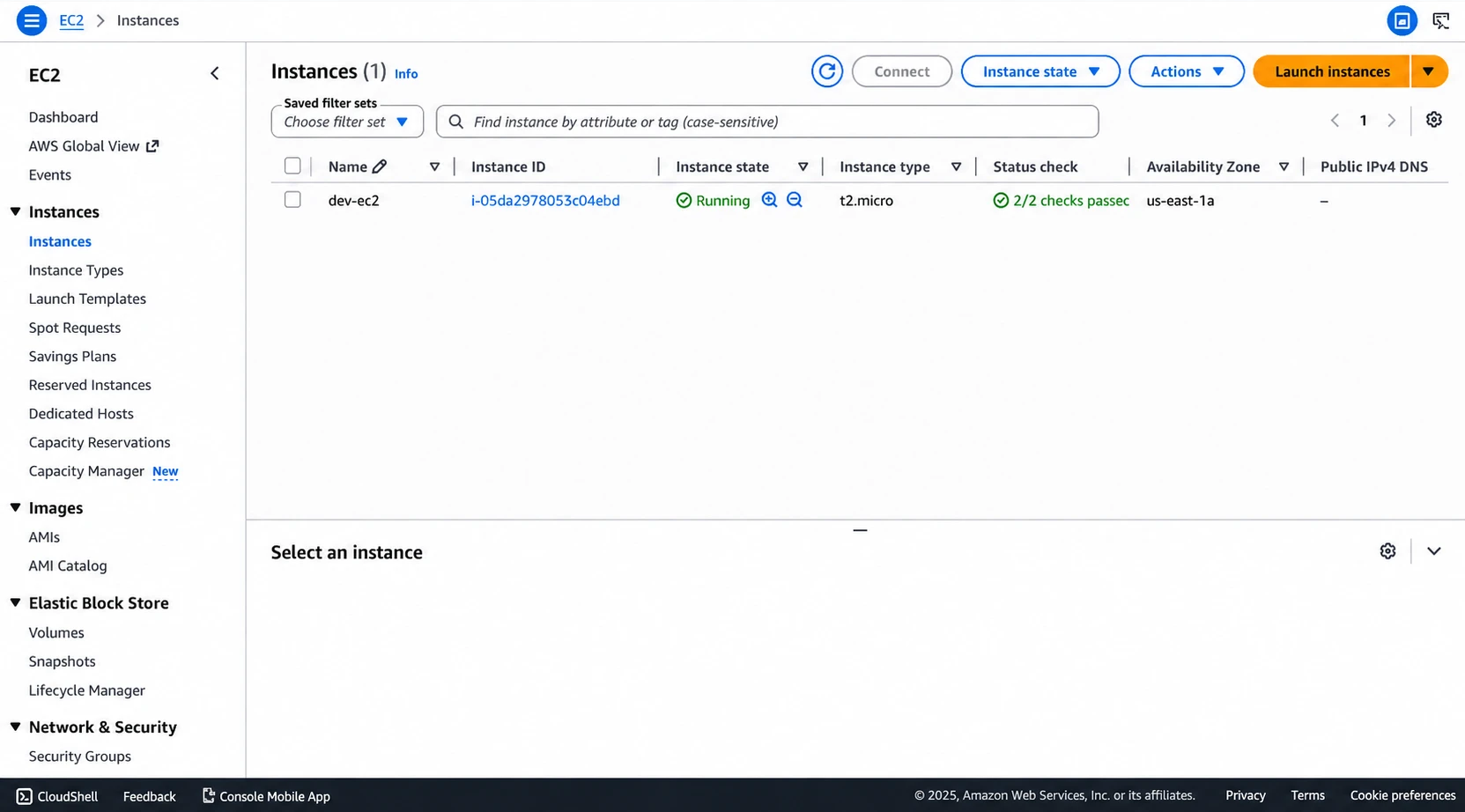
EC2 instance created by the infrastructure pipeline
And the VPC:
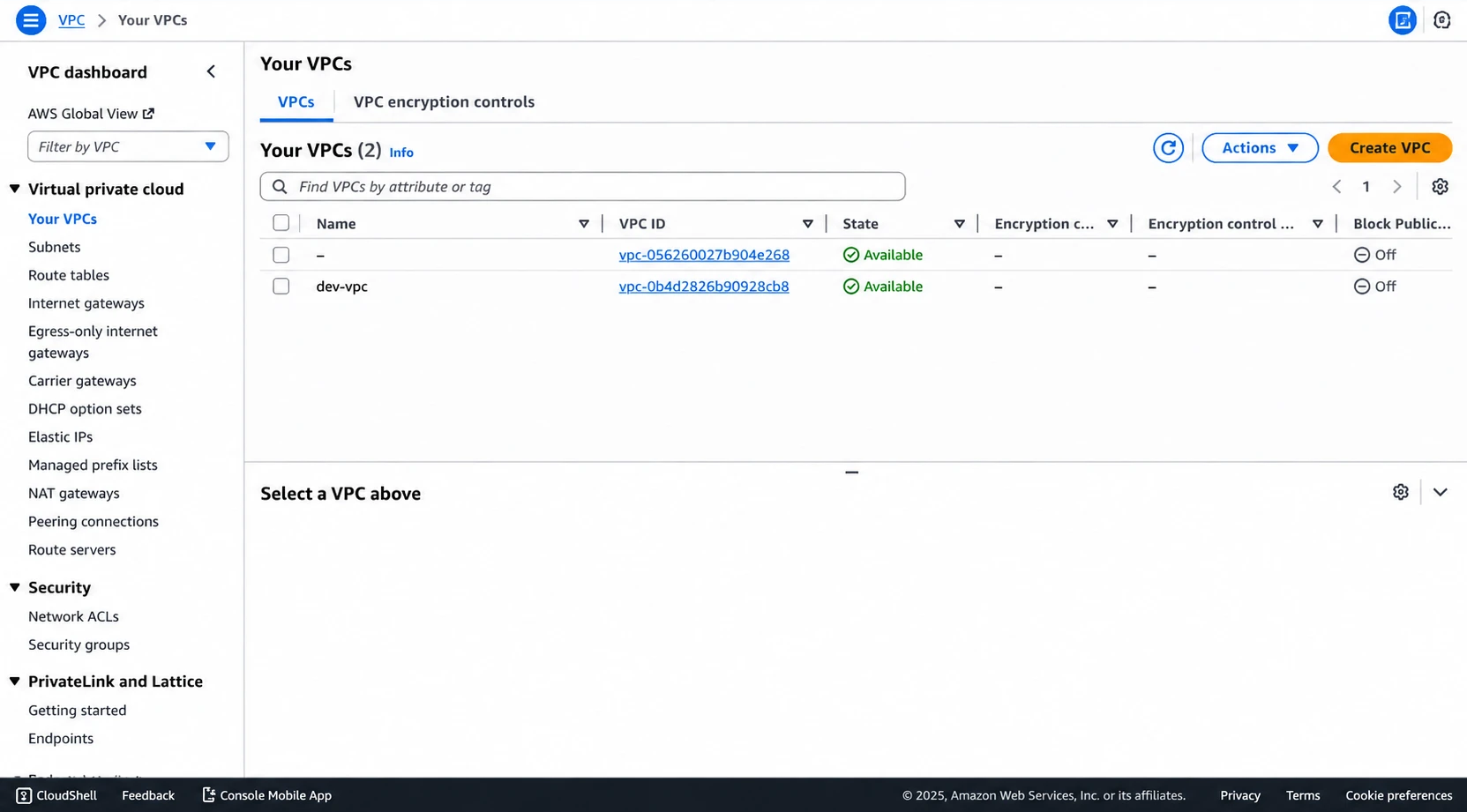
VPC created by the Terraform and Terragrunt deployment
Wrapping up
This goes past creating one resource with Terraform. The value is in how the pieces work together:
reusable Terraform modules
+ environment isolation
+ dependency-aware Terragrunt orchestration
+ remote state
+ GitHub Actions
+ OIDC
+ security checks
+ policy checks
+ cost visibility
Most of what I learned came from wiring things together, not from writing Terraform resources. Remote state bootstrapping, dependencies, OIDC setup, CLI changes, and action updates are the exact problems you hit when infrastructure code moves from a local demo into an automated pipeline.