Normal monitoring tells you a service failed. I wanted mine to fix it too. I built a pipeline that collects Nginx failure logs from EC2 and sends them to Amazon Bedrock for a diagnosis. The diagnosis maps to an approved fix. Then AWS Systems Manager runs that fix without any SSH session.
The setup uses an Amazon Linux 2023 EC2 instance, Nginx, CloudWatch Logs, Lambda, Amazon Bedrock, and SSM Run Command.
Note: I used the Bedrock model identifier
global.anthropic.claude-sonnet-4-6with a cross-region Bedrock client inus-east-1. Model availability, inference profiles, IAM requirements, and pricing can change. Check them against your own account before copying these values.
1. How it fits together
Here is the event path:
EC2 running Nginx
        |
        v
CloudWatch Agent
        |
        v
CloudWatch Logs
        |
        v
Subscription Filter
        |
        v
AWS Lambda
        |
        +--> startup-only pre-check
        |
        +--> maintenance-mode pre-check
        |
        v
Amazon Bedrock
        |
        v
Structured diagnosis
        |
        v
SSM Run Command
        |
        v
Automatic remediation
The goal is simple. Nginx should always be running unless I put it in maintenance mode on purpose.
2. Setting up the EC2 host
The workload is a plain Amazon Linux 2023 instance running Nginx.
The host also needs Systems Manager access and the CloudWatch Agent. That way Lambda gets the logs and can run fixes later without SSH.
EC2 instance running Nginx for the self-healing workflow
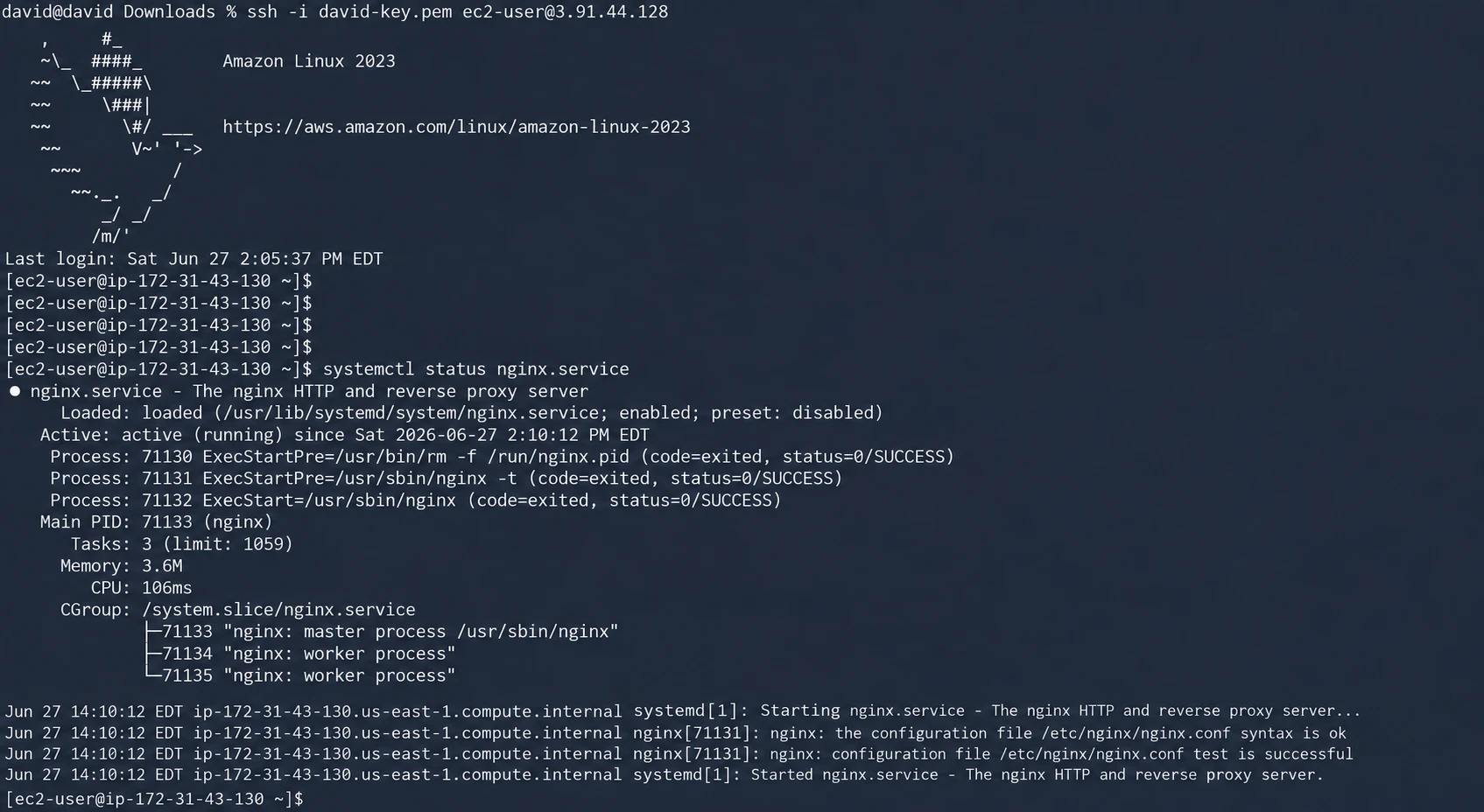
I installed Nginx with the package manager and checked that it was running:
sudo systemctl enable nginx
sudo systemctl start nginx
sudo systemctl status nginx
I also installed, configured, and started the CloudWatch Agent.

Nginx and CloudWatch Agent verification on the EC2 host
The Nginx error logs go to this log group:
/aiops/ec2/nginx/error-logs
I named the log streams like this:
i-<instance-id>/nginx-error
With that naming, Lambda can pull the EC2 instance ID right out of the incoming event.
3. Sending the right logs to Lambda
I created a CloudWatch Logs subscription filter that sends Nginx events to Lambda.
The filter matches these signals:
?error ?ERROR ?notice ?SIGQUIT ?shutting ?failed ?exit

CloudWatch Logs subscription filter for Nginx failures
This part cost me time. Nginx doesn’t always log a shutdown at the ERROR level. At first I only filtered for errors. The graceful shutdown messages showed up as [notice], so they never reached Lambda.
Look at your real application logs before you decide what the filter should match.
4. Lambda runs the workflow
The Lambda function does this in order:
1. Validate that the event came from CloudWatch Logs.
2. Decode the base64/gzip payload.
3. Combine log messages into one analysis input.
4. Determine the EC2 instance ID.
5. Skip startup-only log batches.
6. Skip services currently in maintenance mode.
7. Ask Bedrock to classify the failure.
8. Persist the AI analysis to CloudWatch.
9. Map the returned action key to a predefined shell command.
10. Verify that the EC2 instance is reachable through SSM.
11. Execute the remediation with SSM Run Command.
12. Capture command output and post-fix Nginx status.
The Lambda code is in my repo here:
https://github.com/dcepeda31415/aws-aiops-self-healing
The config and action map start like this:
import json
import boto3
import base64
import gzip
import re
import time
import os
from datetime import datetime

AWS_REGION = os.environ.get("AWS_REGION", "us-east-1")
ANALYSIS_LOG_GROUP = os.environ.get(
    "ANALYSIS_LOG_GROUP",
    "/aiops/lambda/nginx-analysis"
)
MODEL_ID = os.environ.get(
    "MODEL_ID",
    "global.anthropic.claude-sonnet-4-6"
)

bedrock = boto3.client("bedrock-runtime", region_name="us-east-1")
ssm = boto3.client("ssm", region_name=AWS_REGION)
logs = boto3.client("logs", region_name=AWS_REGION)
ec2 = boto3.client("ec2", region_name=AWS_REGION)

REMEDIATION_ACTIONS = {
    "nginx_service_stopped": {
        "command": "sudo systemctl start nginx && sudo systemctl status nginx",
        "description": "Starting Nginx service",
    },
    "nginx_service_failed": {
        "command": "sudo systemctl restart nginx && sudo systemctl status nginx",
        "description": "Restarting failed Nginx service",
    },
    "nginx_config_error": {
        "command": "sudo nginx -t && sudo systemctl reload nginx",
        "description": "Testing and reloading Nginx config",
    },
    "nginx_port_conflict": {
        "command": "sudo systemctl stop nginx && sudo fuser -k 80/tcp && sudo systemctl start nginx",
        "description": "Resolving port conflict and restarting Nginx",
    },
    "disk_full": {
        "command": "sudo journalctl --vacuum-size=100M && sudo find /var/log/nginx -name '*.log' -mtime +7 -delete",
        "description": "Clearing old logs to free disk space",
    },
    "permission_error": {
        "command": "sudo chown -R nginx:nginx /var/log/nginx && sudo chmod 755 /var/log/nginx",
        "description": "Fixing Nginx file permissions",
    },
    "general_restart": {
        "command": "sudo systemctl restart nginx && sudo systemctl status nginx",
        "description": "General Nginx service restart",
    },
}
The biggest design choice is here. Bedrock does not write shell commands that get executed.
It only returns one of a fixed set of action keys:
nginx_service_stopped
nginx_service_failed
nginx_config_error
nginx_port_conflict
disk_full
permission_error
general_restart
none
Lambda maps that key to a command I already approved.
So the model classifies and recommends. It never gets a free shell.
5. Decoding the CloudWatch Logs event
Subscription events arrive base64 encoded and gzip compressed.
I decode them like this:
def decode_cloudwatch_logs(event):
    encoded = event["awslogs"]["data"]
    compressed = base64.b64decode(encoded)
    decompressed = gzip.decompress(compressed)
    return json.loads(decompressed)
After decoding, the function reads:
logGroup
logStream
logEvents
I join the messages into one string before the pre-checks and the Bedrock call.
6. Finding the target instance
First the function tries to pull the instance ID from the log stream name:
match = re.search(r"(i-[a-f0-9]{8,17})", log_stream)
If that fails, it falls back to an EC2 lookup by tag:
Name = aiops-nginx-lab
That way one oddly named log stream doesn’t break the whole pipeline.
In a bigger environment I wouldn’t lean on one static Name tag. I’d put the instance identity in the telemetry or keep a clear mapping from log streams to targets.
7. Stopping remediation loops early
Self-healing can loop on itself:
Nginx fails
→ Lambda restarts Nginx
→ startup logs arrive
→ Lambda analyzes startup logs
→ another remediation is triggered
I stop this with an early pre-check.
It looks for shutdown or failure signals like these:
sigquit
sigterm
shutting down
worker process exited
exited with code
[error]
[crit]
[alert]
connection refused
no space left
bind() failed
open() failed
If none show up, the batch is startup-only. The function exits before it ever calls Bedrock.
That saves inference cost and prevents a second fix from firing.
8. Adding maintenance mode
Planned maintenance should not look like an outage.
I handle this with a Lambda environment variable:
MAINTENANCE_MODE_SERVICES=nginx

Lambda maintenance-mode environment variable
It takes a comma separated list for more services:
MAINTENANCE_MODE_SERVICES=nginx,mysql,apache2
Lambda checks which service shows up in the logs and compares it to that list.
If the service is in maintenance, processing stops before Bedrock and SSM.
That means:
no Bedrock analysis charge
no automatic restart
no interference with planned work
To turn healing back on, I remove the service from the variable.
9. Getting structured answers from Bedrock
If the pre-checks pass, the combined logs go to Bedrock.
My prompt gives the model strict rules.
For example:
SIGQUIT or SIGTERM
→ nginx_service_stopped

failed to start / non-zero exit
→ nginx_service_failed

configuration test failed / unknown directive
→ nginx_config_error

address already in use
→ nginx_port_conflict

no space left
→ disk_full

permission denied
→ permission_error
It has to answer in this JSON shape:
{
  "issue": "one-line summary",
  "root_cause": "technical explanation",
  "severity": "LOW|MEDIUM|HIGH|CRITICAL",
  "fix": "recommended fix",
  "remediation_action": "nginx_service_stopped",
  "prevention": "future prevention",
  "estimated_impact": "affected users or services"
}
I tell the model to return only JSON. I also strip Markdown code fences in case it adds them anyway.
A vague prompt did not work. At first Bedrock decided a graceful shutdown was intentional and returned no fix.
That was the wrong call for my setup. My rule was simple:
Nginx must be running unless maintenance mode is enabled.
So I rewrote the prompt to follow signals instead of guessing intent.
10. Keeping Bedrock and regional clients separate
The Lambda runs in:
us-east-1
The Bedrock cross-region inference profile uses its own client, pinned to:
us-east-1
Every other client uses the Lambda’s own region. Both happen to be us-east-1 here, but I kept them separate so the Lambda can move regions without breaking the Bedrock call:
AWS_REGION = os.environ.get("AWS_REGION", "us-east-1")

ssm  = boto3.client("ssm", region_name=AWS_REGION)
logs = boto3.client("logs", region_name=AWS_REGION)
ec2  = boto3.client("ec2", region_name=AWS_REGION)
I learned this one the hard way. I had hardcoded SSM and EC2 to the wrong region. The fix step kept failing even though everything else looked healthy.
11. IAM permissions for Lambda
The Lambda role needs to call SSM and read EC2.
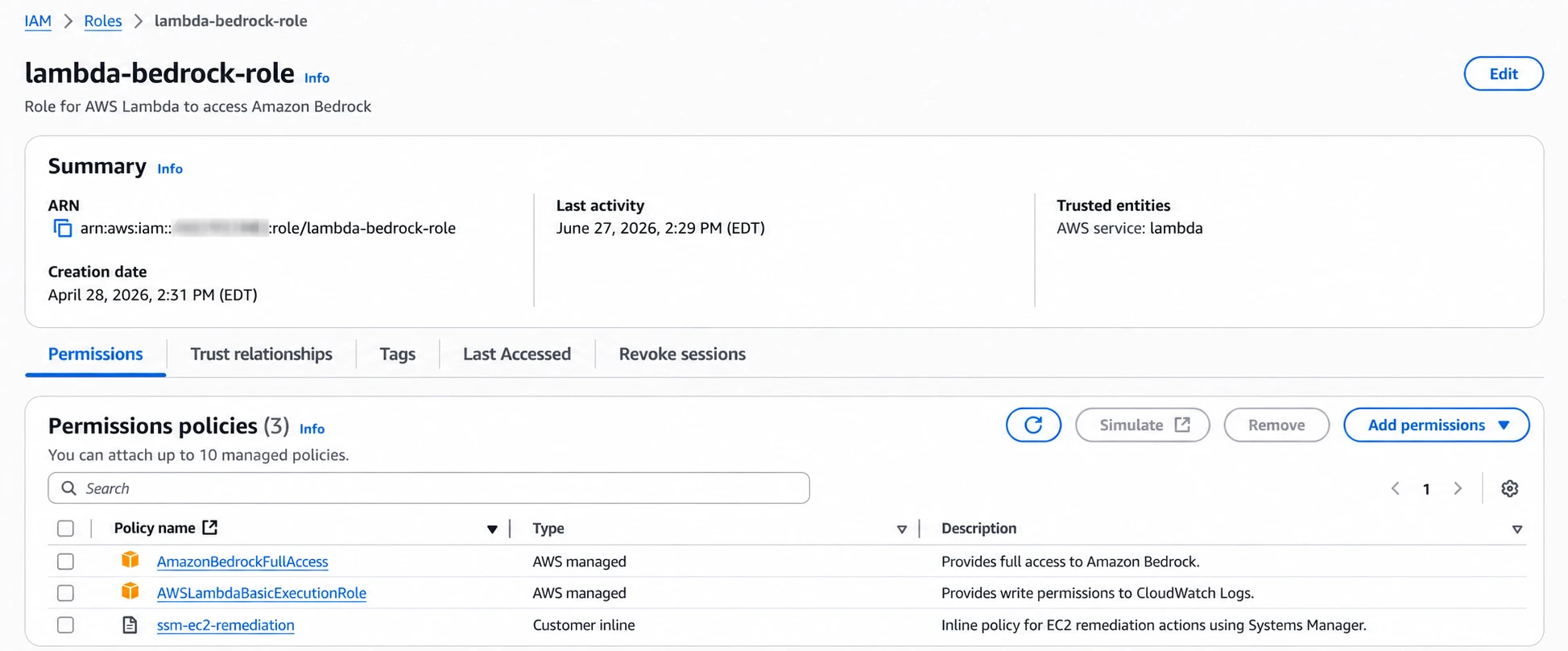
IAM role used by the AIOps Lambda function
My custom policy includes:
{
  "Version": "2012-10-17",
  "Statement": [
    {
      "Sid": "SSMRunCommand",
      "Effect": "Allow",
      "Action": [
        "ssm:SendCommand",
        "ssm:GetCommandInvocation",
        "ssm:ListCommandInvocations",
        "ssm:DescribeInstanceInformation"
      ],
      "Resource": "*"
    },
    {
      "Sid": "EC2Describe",
      "Effect": "Allow",
      "Action": [
        "ec2:DescribeInstances",
        "ec2:DescribeInstanceStatus"
      ],
      "Resource": "*"
    }
  ]
}
Depending on how you build the role, it also needs permissions for:
Bedrock model invocation
CloudWatch Logs writes
Lambda logging
For production, cut down the wildcards wherever the APIs support resource-level limits.
12. Running the fix through Systems Manager
No SSH anywhere.
Before sending a command, Lambda checks the instance’s SSM status:
ssm.describe_instance_information(
    Filters=[
        {
            "Key": "InstanceIds",
            "Values": [instance_id]
        }
    ]
)
It expects:
PingStatus = Online
Then it sends the fix through:
AWS-RunShellScript
For a stopped Nginx service the action is:
sudo systemctl start nginx && sudo systemctl status nginx
The command also checks the result afterward:
sudo systemctl is-active nginx && echo "NGINX_STATUS: RUNNING" || echo "NGINX_STATUS: STOPPED"
Lambda polls the invocation until it finishes or hits the wait limit.
The result includes:
status
stdout
stderr
exit code
command ID
execution time
13. Saving the analysis
The Bedrock analysis goes to its own log group:
/aiops/lambda/nginx-analysis
The streams are named like this:
<instance-id>/YYYY/MM/DD
Each record holds:
timestamp
instance ID
structured AI analysis
a sample of the original logs
This gives me an audit trail that is separate from the raw Nginx logs and the Lambda logs.
14. Testing a real Nginx failure
To test the whole thing, I stopped Nginx.
The shutdown signals arrived. Lambda caught them and sent the logs to Bedrock.
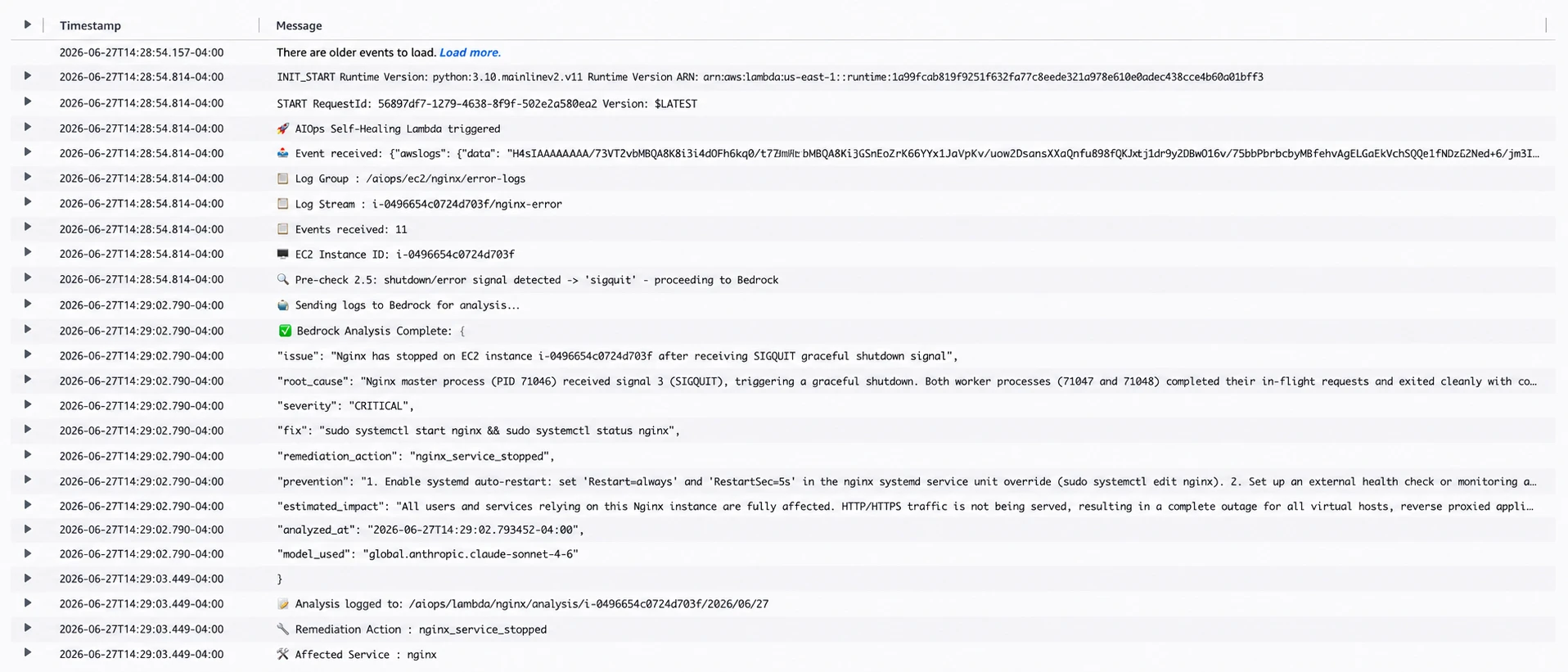
CloudWatch log output from a self-healing test run
The flow looked like this:
AIOps Lambda triggered
Events received
EC2 instance identified
SIGQUIT detected
Bedrock invoked
CRITICAL / nginx_service_stopped returned
SSM target reports Online
Run Command sent
exit code 0
Nginx active again
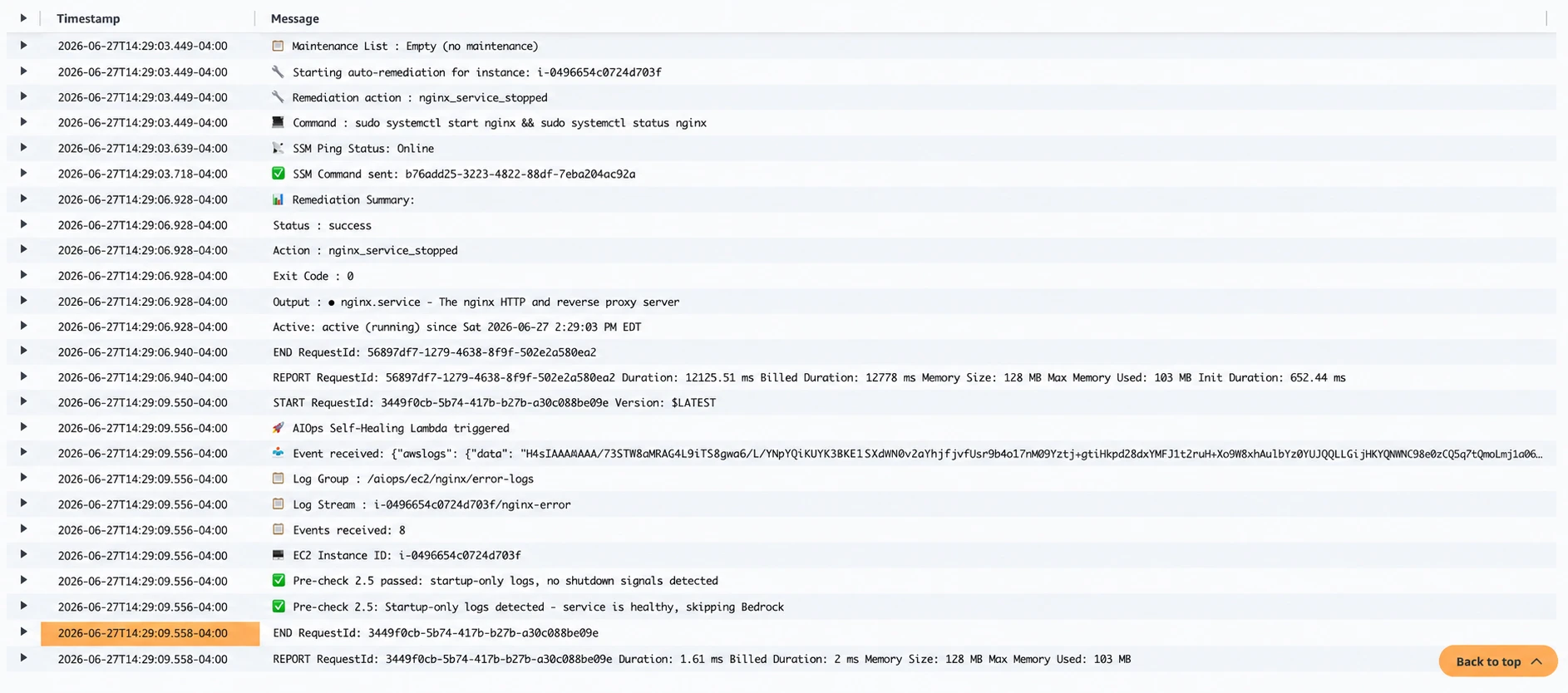
SSM remediation output, then the startup-only second trigger skipped before Bedrock analysis
Here is a trimmed version of the real output:
🚀 AIOps Self-Healing Lambda triggered
📋 Events received: 11
🖥️ EC2 Instance ID: i-0496654c0724d703f
🔍 Pre-check: shutdown signal found → 'sigquit'
🤖 Sending logs to Bedrock for analysis...
✅ Bedrock: { "severity": "CRITICAL",
              "remediation_action": "nginx_service_stopped" }
📡 SSM Ping Status: Online
✅ SSM Command sent: cmd-xxxxxxxxxxxxxxxxx
📊 Status: success | Exit Code: 0
   Output: nginx.service ... Active: active (running)
15. Checking that the second trigger gets skipped
Restarting Nginx creates new log lines.
Those startup logs hit the same subscription, so Lambda runs again.
This is where the startup-only check earns its place.
The logs show:
✅ Pre-check 2.5 passed:
   startup-only logs, no shutdown signals detected

✅ Startup-only logs detected:
   service is healthy, skipping Bedrock
No second Bedrock call. No duplicate fix.
16. What I learned
Check real log levels before writing filters. Nginx logs graceful shutdowns as [notice]. An ERROR-only filter misses the event that should start everything.
Use explicit rules when a machine takes action. The model was right that a graceful shutdown can be intentional. But automation needs rules that match the policy, not a judgment call.
Be explicit about regions. Lambda, EC2, SSM, CloudWatch, and Bedrock don’t always share the same regional endpoint.
Use SSM instead of SSH for automation. No key pairs to manage. I get a managed API, command history, status reporting, and IAM-controlled access.
17. What I’d harden for production
Before using this pattern for production, I’d add a few controls.
Keep the allowlist of actions small. Never run shell commands the model writes.
Add retry limits and a cooldown so repeated failures can’t cause a runaway loop.
Send alarms or SNS notifications when a fix fails, when SSM is offline, or when the same service keeps breaking.
Move maintenance state somewhere easier to manage than a hand-edited environment variable once there are more services.
Scope IAM to the smallest set of resources that works.
Add a human approval step for risky actions instead of making every call automatic.
Log both the AI decision and the exact command that ran.
18. Repo and next steps
The GitHub repository includes the code and README.
The README covers:
EC2 preparation
CloudWatch Agent configuration
IAM roles
Lambda deployment
test cases
Things I want to add next:
SNS or email alerts after remediation
CloudWatch dashboards
additional services such as Apache, MySQL, and Node.js
multi-instance support
Wrapping up
This build mixes fixed automation with AI diagnosis.
CloudWatch collects and routes the logs. Lambda runs the workflow. Bedrock sorts the failure into one allowed action key. Systems Manager runs the approved fix. Maintenance mode and the startup-only check keep the automation from fighting planned work or triggering itself.
The part I care about most is the boundary around the model. Bedrock picks from a fixed list. Lambda decides which predefined command is allowed to run.
That keeps the model as one piece of the system. It never gets direct access to the server.